Explore the WildFly
Management Model
Ask questions about WildFly's management model from any AI agent — search, compare, and explore across versions and feature packs.
Supports all WildFly versions starting with 10, plus feature packs like AI, gRPC, GraphQL, and MyFaces.
What You Can Ask
Use natural language or the /mgt:model slash command in Claude Code. The
skill also activates automatically in any MCP‑compatible agent.
- How do I add a new datasource?
- How does the logging subsystem work?
- How is TLS configured?
- Tell me more about credential stores.
- Compare the last two versions of WildFly.
- Compare the undertow subsystem between WildFly 12 and now.
- What resources have been deprecated recently?
- Show me a breakdown of the stability levels.
- Are there any preview features?
- Are there timeout attributes without a time unit?
- Find password attributes not marked as sensitive.
- Are there conflicting attribute dependencies?
- Which resources have the most attributes?
- Are there capabilities declared but never referenced?
- What resources does the AI feature pack provide?
- How is the gRPC feature pack structured?
- How do I configure the GraphQL feature pack?
- Give me an overview of the MyFaces feature pack.
Get Started
Requires
Docker or
Podman
to run model database containers.
Node for the MCP server.
The mgt CLI is bundled automatically.
claude plugin marketplace add
                                    https://github.com/model-graph-tools/claude-plugin
claude plugin install mgt@model-graph-tools
Using a different agent? The MCP server works with any MCP‑compatible client — Cursor, Windsurf, Copilot, Gemini CLI, and others.
See What You Can Ask for example queries, or browse the model
interactively with mgt browse 39.
curl -fsSL https://model-graph-tools.github.io/mgt/install.sh | sh
brew tap hpehl/tap && brew install mgt
cargo install mgt
The MCP server bundles mgt automatically. Install standalone if you want to use mgt directly from the command line.
mgt start 39
The MCP server starts containers automatically when needed. Use this to pre‑load a version.
How It Works
Model Database
The management model is stored as a graph in a Neo4j database. It contains nodes and relationships for resources, attributes, operations, capabilities, and more.
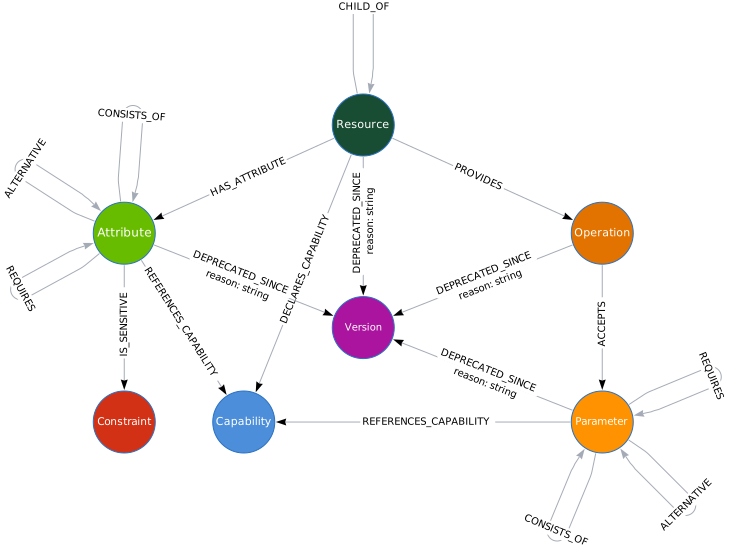
The Ecosystem
Parse the management model and store it as a Neo4j graph. Used internally by mgt — only needed for custom analysis.
- Live server or doc ZIP
- Full resource tree
- Capabilities & relationships
Orchestrate the analysis pipeline and manage model containers. Bundled with the MCP server — install standalone for direct CLI use.
- Analyze WildFly and feature packs
- Start/stop model containers
- Browse with Neo4j (
mgt browse <version>)
Explore the model from AI agents via MCP and agent skills.
- Search & browse resources
- Compare versions
- Run Cypher queries
FAQ
No. The management model is pre-extracted and stored in the graph database. You can explore any WildFly version without installing or running a server.
Docker or Podman to run the model database containers. Node for the MCP server. Each version uses roughly 1.2 GB of disk space.
All major releases from WildFly 10 onwards, plus selected feature packs like the AI
subsystem. Run mgt versions and
mgt feature-packs to see the full list.
A container image (~400 MB compressed) containing a Neo4j database pre-loaded with the full management model for that WildFly version. After the first pull, subsequent starts are instant.
On quay.io/modelgraphtools/model. They are pulled automatically when you start a version for the first time.
Yes. Each version runs in its own container, so you can start several in parallel.
Yes, once a version's container image has been pulled. The graph database runs entirely on your machine with no external network calls.
The graph data is read-only and baked into each container image. Stopping and restarting a version gives you the same data every time.
Run mgt browse <version> to open the Neo4j browser, where you
can write and execute Cypher queries directly.